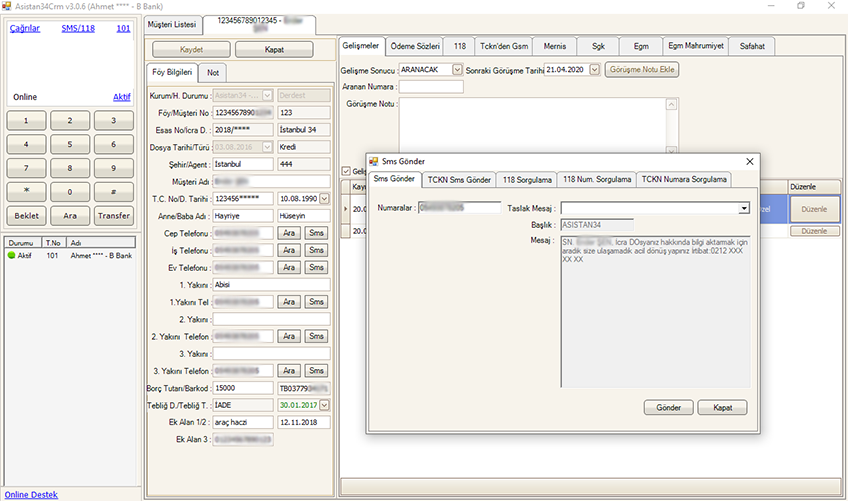
In enforcement follow-up and debt collection, the biggest challenge is keeping an accurate, up-to-date view of the status of hundreds or even thousands of files. Asistan34's debtor tracking CRM lets you manage every step in one place, from the moment a file is transferred to the system until the enforcement stage.
Every call is recorded in the file
Every call made since the date the file was transferred is recorded. You can follow call outcomes with sub-statuses that you define yourself. For example, you can set up headings such as "To be called", "Note left", "Payment promise received" or "Salary garnishment applied" and sort files by their status.
Automatic records and reminders
- Appointments you create open automatically on your screen when the time comes.
- SMS messages you send are saved to the debtor file.
- UYAP query results are recorded in the debtor file automatically.
- Notification (tebligat) results also appear in the file.
Payment promises and data import
The payment promise note and date taken during a call are stored in the file, and you can report on payment promises to follow them up. You can import files sent by your client institutions in bulk using Excel or the reports you obtain from the institutions' own systems, and update existing files in bulk.
Order is kept as the number of files grows
As the number of files from client institutions grows, manual tracking methods fall short. In Asistan34, files are separated by status, so you can quickly list the files to be called today, those where a note was left and those with a payment promise. Managers can report on the call data of the whole office or of individual staff, and distribute work according to the files that carry the highest risk. Because file information is gathered in a single record, problems such as several people speaking to the same debtor with different information also decrease. The recorded call history also prevents loss of information when staff change or work is handed over; the newly assigned person can immediately see how the file has progressed.
This way, your law office call center can see at any moment which file is at which stage, who called whom, and what the result was. To see how debtor and customer tracking can be set up in your own workflow, request a demo.